selenium wire,直接拿取某个请求返回的数据,或传入的参数。
1.环境要求
·
Python 3.6 +
· Selenium 3.4.0 +
2.安装 pip install selenium-wire
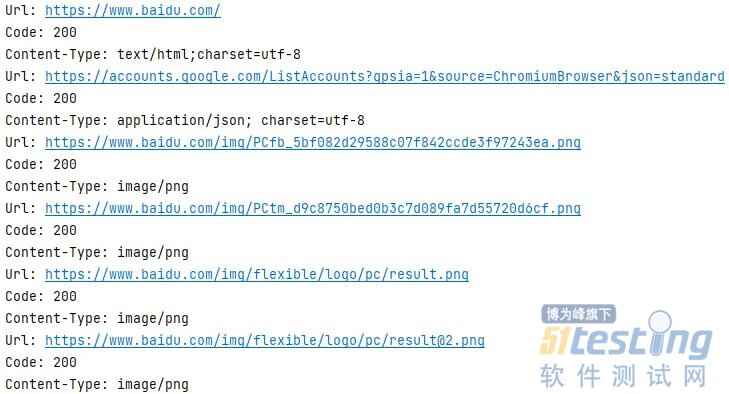
3.示例 from seleniumwire import webdriver driver = webdriver.Chrome() driver.get('https://www.baidu.com') # 通过requests属性访问请求 for request in driver.requests: if request.response: print("Url:", request.url) print("Code:", request.response.status_code) print("Content-Type:", request.response.headers['Content-Type'])
运行结果(前六条请求):
4.拦截器 可以在某些请求发出前,修改请求的参数或直接阻止请求。 import json from seleniumwire import webdriver # 设置拦截器 def interceptor(request): # 拦截.png,.jpg,.gif结尾的请求 if request.path.endswith(('.png', '.jpg', '.gif')): request.abort() driver = webdriver.Chrome() driver.request_interceptor = interceptor driver.get('https://www.baidu.com') # 通过requests属性访问请求 for request in driver.requests: if request.response: print("Url:", request.url) print("Code:", request.response.status_code) print("Content-Type:", request.response.headers['Content-Type'])
运行结果(前六条请求):

5.添加和修改请求参数 # 设置拦截器 def interceptor(request): # 添加请求参数 params = request.params params['foo'] = 'bar' request.params = params # 修改POST请求正文中的JSON if request.method == 'POST' and request.headers['Content-Type'] == 'application/json': # 获取原请求内容 body = request.body.decode('utf-8') data = json.loads(body) # 修改要改变的参数 data['foo'] = 'bar' # 将修改好的参数设置回请求 request.body = json.dumps(data).encode('utf-8') # 更新内容长度 del request.headers['Content-Length'] request.headers['Content-Length'] = str(len(request.body))
本文内容不用于商业目的,如涉及知识产权问题,请权利人联系51Testing小编(021-64471599-8017),我们将立即处理
权威发布,测试选择不纠结!第15届软件测试行业报告,直击行业发展,把握未来方向!