背景 UI自动化过程中,必然会遇到加载问题、环境不稳定、网络慢的情况,如果不做任何处理就会因为没有找到元素而报错。 另外一种情况就是页面使用了ajax异步加载机制(现在都是resetful,客户端和服务端都是分离的),不知道页面是什么时候到达的。这时我们就要用到wait,而在
Selenium 中,我们一共有三种等待,分别是固定等待、隐式等待和显式等待。
time.sleep 固定等待,本质:让当前的线程睡眠,实质是线程的阻塞(blocking),用wait 方式实现。 缺点:网络条件好浪费时间,严重影响项目的性能。 好处:调试脚本可以用。
implicitly_wait 隐式等待,本质:在脚本的开始设置一个最长等待时间,如果在规定时间内网页加载完成,则执行下一步,否则可能抛出异常。隐式等待对整个driver周期都起作用,在最开始设置一次就可以了,不要当作固定等待使用。 缺点:JavaScript一般都是放在我们的body的最后进行加载,实际这时页面的元素都已经加载完毕,我们却还在等待全部页面加载结束。
WebDriverWait 显式等待,本质:动态的等待,判断某一个元素是不是已经出现了,比如title是不是叫
百度或百度搜索,根据动态的一些条件来轮询,它会不停的轮询去给我们检测,条件是成功还是失败,比如0.5s就检测一次这个元素在这个条件下是成功还是失败。同时设置轮询的超时时间。 如果同时设置了显式等待和隐式等待,就看谁设置的等待时间长,谁的超时等待时间长,就用谁的执行。
显式等待
模块 from selenium.webdriver.support.wait import WebDriverWait
WebDriverWait 的源码 # Licensed to the Software Freedom Conservancy (SFC) under one # or more contributor license agreements. See the NOTICE file # distributed with this work for additional information # regarding copyright ownership. The SFC licenses this file # to you under the Apache License, Version 2.0 (the # "License"); you may not use this file except in compliance # with the License. You may obtain a copy of the License at # # http://www.apache.org/licenses/LICENSE-2.0 # # Unless required by applicable law or agreed to in writing, # software distributed under the License is distributed on an # "AS IS" BASIS, WITHOUT WARRANTIES OR CONDITIONS OF ANY # KIND, either express or implied. See the License for the # specific language governing permissions and limitations # under the License.
import time from selenium.common.exceptions import NoSuchElementException from selenium.common.exceptions import TimeoutException
POLL_FREQUENCY = 0.5 # How long to sleep inbetween calls to the method IGNORED_EXCEPTIONS = (NoSuchElementException,) # exceptions ignored during calls to the method
class WebDriverWait(object): def __init__(self, driver, timeout, poll_frequency=POLL_FREQUENCY, ignored_exceptions=None): """Constructor, takes a WebDriver instance and timeout in seconds.
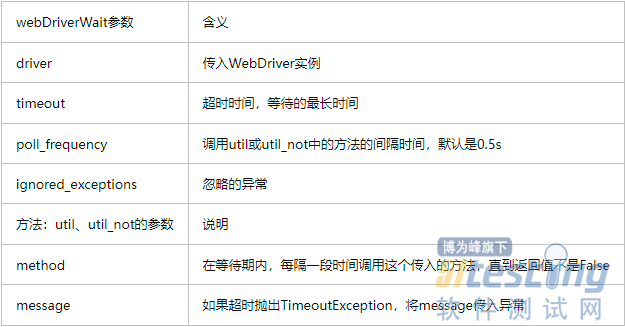
:Args: - driver - Instance of WebDriver (Ie, Firefox, Chrome or Remote) - timeout - Number of seconds before timing out - poll_frequency - sleep interval between calls By default, it is 0.5 second. - ignored_exceptions - iterable structure of exception classes ignored during calls. By default, it contains NoSuchElementException only.
Example: from selenium.webdriver.support.ui import WebDriverWait \n element = WebDriverWait(driver, 10).until(lambda x: x.find_element_by_id("someId")) \n is_disappeared = WebDriverWait(driver, 30, 1, (ElementNotVisibleException)).\ \n until_not(lambda x: x.find_element_by_id("someId").is_displayed()) """ self._driver = driver self._timeout = timeout self._poll = poll_frequency # avoid the divide by zero if self._poll == 0: self._poll = POLL_FREQUENCY exceptions = list(IGNORED_EXCEPTIONS) if ignored_exceptions is not None: try: exceptions.extend(iter(ignored_exceptions)) except TypeError: # ignored_exceptions is not iterable exceptions.append(ignored_exceptions) self._ignored_exceptions = tuple(exceptions)
def __repr__(self): return '<{0.__module__}.{0.__name__} (session="{1}")>'.format( type(self), self._driver.session_id)
def until(self, method, message=''): """Calls the method provided with the driver as an argument until the \ return value is not False.""" screen = None stacktrace = None
end_time = time.time() + self._timeout while True: try: value = method(self._driver) if value: return value except self._ignored_exceptions as exc: screen = getattr(exc, 'screen', None) stacktrace = getattr(exc, 'stacktrace', None) time.sleep(self._poll) if time.time() > end_time: break raise TimeoutException(message, screen, stacktrace)
def until_not(self, method, message=''): """Calls the method provided with the driver as an argument until the \ return value is False.""" end_time = time.time() + self._timeout while True: try: value = method(self._driver) if not value: return value except self._ignored_exceptions: return True time.sleep(self._poll) if time.time() > end_time: break raise TimeoutException(message)
参数:
三种等待方式的实例 from selenium import webdriver from time import sleep from selenium.webdriver.support.wait import WebDriverWait from selenium.webdriver.support import expected_conditions as EC
# 三种等待方法 class TestCase(object): def __init__(self): self.driver = webdriver.Chrome() self.driver.get('https://www.baidu.com') sleep(2)
def test_sleep(self): self.driver.find_element_by_id('kw').send_keys("selenium") sleep(2) # 线程的阻塞 blocking wait 方式实现 self.driver.find_element_by_id('su').click() sleep(3) self.driver.quit()
def time_implicitly(self): self.driver.implicitly_wait(10) self.driver.find_element_by_id('kw').send_keys("webdriver") self.driver.find_element_by_id('su').click() # sleep(2) self.driver.quit()
def time_wait(self): wait = WebDriverWait(self.driver,2,0.5) wait.until(EC.title_is('百度一下,你就知道')) self.driver.find_element_by_id('kw').send_keys("webdriver") self.driver.find_element_by_id('su').click() sleep(2) self.driver.quit()
if __name__=="__main__": case = TestCase() # case.test_sleep() # case.time_implicitly() case.time_wait()
本文内容不用于商业目的,如涉及知识产权问题,请权利人联系51Testing小编(021-64471599-8017),我们将立即处理
权威发布,测试选择不纠结!第15届软件测试行业报告,直击行业发展,把握未来方向!